

Overview
Welcome to instant quote, our convenient self-quoting tool for CNC machining and digital printing services on Polycase enclosures. With over 30 years of experience, we can handle all your project’s needs, from complex cutouts to full color printing, we will save you time and money on your end product.
CNC Machining
From basic cutouts for cables, or buttons, to advanced hole types and more- we save you the hassle of sending your enclosure to a third party by fulfilling your machining needs before your enclosure leaves our door, all at a cost-effective price.
Digital Printing
Adhesive labels can take hours to place, end up crooked, and never last long. Our digital printing services eliminate all of that for a long-term solution printed directly onto the enclosure, adding a level of professionalism that labels just can’t.
Quotes can be completed in 4 easy steps:
1.) Select your Polycase Product
2.) Choose your CNC machining requirements
3.) Choose your digital printing requirements
4.) Save and view your Instant Quote
From here you can attach drawings to your quote and add it to your cart for convenient online ordering.
For an in-depth walkthrough of our Instant Quote tool, visit the “Tutorial” tab.
Curious about what happens after you place your order? Watch our video here.
Tutorial
-
STEP 1
Product
Select Product Series
Start your quote by selecting the product series you want to customize. The first two letters of the part number typically indicate the series name. Select the appropriate series from the dropdown menu.
Select Product Part Number
Next, select the part number of the product to be quoted. Once selected, any available options for that part will be presented for you to make selections from. Once your options are selected you can click "continue" to move on to the next step
At any point in the process you can restart your quote by clicking "restart" or save your progress by clicking "save for later".
-
STEP 2
Machining
Select Machining Options
The next step is selecting your machining requirements. Machining is based on the number of surfaces being machined, and the total number of features. Make selections based on the options presented to you. A drawing indicating the area(s) available to machine is displayed for reference. Tool tips are available at each step to guide you through the process.
Machining Requirements
We do not need to know the size, location or details of machining for the quoting process. Machining information/drawings are not required until you are ready to order your customized project.
If you do not require machining, you can simply continue on to printing.
-
STEP 3
Printing
Select Printing Options
The last step is selecting your printing/graphics requirements. Printing is based on the number of surfaces being printed, and number of colors per surface. Make selections based on the options presented. A drawing indicating the area(s) available to print is displayed for reference. Tool tips are available at each step to guide you through the process.
Printing Requirements
We do not need to know the size, location or details of printing for the quoting process. Drawings/graphics are not required until you are ready to order your customized project
If you do not require printing, you can proceed to the summary page.
FAQs
(13) Customization Overview
Polycase does not provide first articles. Instead, you submit your drawings with your order, and our engineering team reviews them and creates production drawings for your approval. Production will not begin until those drawings are approved, ensuring the final product is manufactured to your specifications.
If you'd like to test a prototype before moving forward, you can order a single piece since we have no minimum order quantities. We guarantee the final product will conform to the approved production drawings.
Need help ensuring your components align with your design? We also offer fit-to-sample services, where you send us your components and our engineers create the production drawings for you, eliminating uncertainty before production.
When a customized enclosure is revised, the original version becomes obsolete and cannot be ordered. If you later decide you need to order the original version, we’ll need to set it up as a new custom part.
This means:
• A new part number will be created
• The one-time fees will apply
A fit-to-sample is a reverse-engineering service where you send Polycase your physical components, and our team custom-designs the enclosure to fit them perfectly. We highly recommend this option if you are unable to provide exact drawings or are uncertain about your current designs.
The cost typically ranges from $150 to $600. In rare occasions, the cost may extend above this range. The quote surfaces and features may change depending on the submitted components. We’ll ask you to send all relevant components, including circuit boards, custom-machined enclosures, and panel mount connectors. Once we receive your items, we'll confirm the price and proceed with your custom order, returning your parts along with the completed enclosure.
During the fit-to-sample process, we will submit drawings for approval along with any additional notes or questions. You will need to confirm that all the features you believe are required are accounted for. You will also need to acknowledge any notes or questions. Please note that sometimes these sizes and locations will change after approval.
Production drawings are created after a custom order is placed. Polycase will create production drawings from your drawings, upload them to your account for review, and require your approval before starting production. Production will strictly follow our production drawings, so it is critical to verify their accuracy before approval. For the standard 3-week lead time, production files are typically completed within 1-2 weeks. We do not provide first articles.
To find all your custom quotes, log in and navigate to your Polycase account. There, you'll find your quotes under "My Quotes & Custom Parts."
If you're part of a company account, your personal quotes will still be under "My Quotes & Custom Parts," while quotes created by your colleagues will be listed under "Company Quotes & Custom Parts." This system helps you easily distinguish between your quotes and those created by your colleagues
These are setup charges applied to the first order of a new custom project. They cover the setup work required by our engineering team to review your drawings, create production drawings, and generate programming files for the machines. You won’t be charged these fees again after the initial order unless you revise the machining or graphics. Any revisions that require engineering involvement will result in new setup charges.
A new custom part is a stock product with your requested machining or graphics, assigned a unique part number and one-time setup fees.
A revision updates an existing custom part and also includes one-time fees. Important Note: Once ordered, the existing version becomes obsolete and can't be reordered.
To order a custom product on behalf of your customer, you need their Polycase custom part number, quote number, or Polycase drawings. Alternatively, your customer can contact Polycase directly to authorize you as the purchaser for future orders. Polycase values and protects our customers’ privacy.
Polycase's standard lead time for customized enclosures is three weeks, provided the unmodified item is in stock. One and two week expedite options are available at an additional cost and are shown on your quote.
You can get immediate pricing, generate a formal quote, and place an order for custom enclosure machining and printing within 90 seconds by using the Polycase Instant Quote tool.
If you have questions generating your quote, contact Polycase and we will be happy to assist.
Curious about what happens after you place your order? Watch our video here.
Mounting bosses are built directly into the mold and cannot be moved or repositioned. However, we can supply enclosures without mounting bosses or machine the existing bosses out.
For more flexibility, we offer adhesive PCB mounting standoffs that allow you to position your PCB mounting points exactly where needed.
Alternatively, we can machine countersunk holes into the enclosure at your desired mounting locations. Standoffs can then be secured using countersunk screws, allowing you to fasten your PCB to the standoffs inside the enclosure.
Polycase offers a wide selection of standard, off-the-shelf electronic enclosures that can be customized to meet your specific application requirements. While we do not offer custom injection molding or tooling services, we provide enclosure customization options, including CNC machining and digital printing.
Our customization services allow you to add precision-cut holes, cutouts, and custom printing without the cost or lead time associated with custom molding.
Learn more about our custom enclosure services or use our instant quote tool to get pricing for your project.
(6) CNC Machining
Polycase offers tabbed and recessed CNC-machined knockouts that give you flexibility to create access points in your enclosure only when needed.
Tabbed Knockouts: These cutouts are mostly removed, but a few small tabs of material are left to hold the knockout in place. You can easily clip these tabs on-site to create a full thru hole when necessary.
Recessed Knockouts: These are shallow outlines machined into the enclosure wall, reducing the material thickness (typically to about 0.020") without penetrating it. This creates a “breakaway” area that maintains the enclosure’s waterproof rating until you're ready to punch it out.
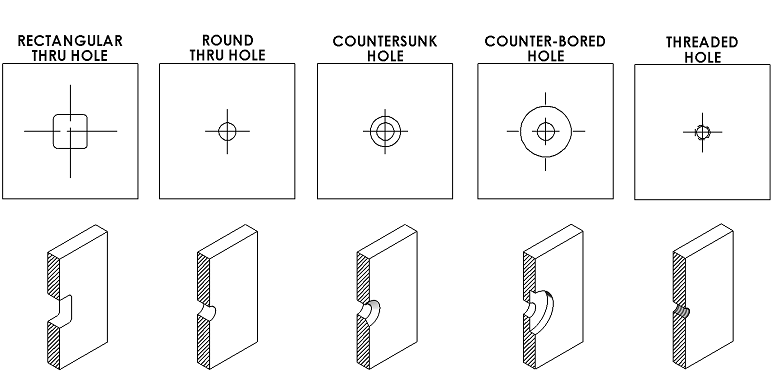
A feature consists of any size or shape through-holes, countersinks, counter-bores, recesses, bevels, taps, screw tower removals, mounting boss removals, or interior wall thinning.
For example
- A simple round hole counts a 1 feature
- A round hole with a countersink counts as 2 features (1 for the hole, 1 for the countersink)
- Counterbored holes or threaded holes are also counter as 2 features
Examples of common features are shown below. Non-standard features can be quoted by contacting customer service.
Yes, Polycase can machine down the height, or remove, the mounting bosses. Because they are only ¼” tall, often they do not interfere with the desired application, but if they do, they can be machined out or made shorter. Additionally, some of our enclosures are available with or without the bosses.
Yes, Polycase can machine down the height of an enclosure, but it is only recommended for potting boxes or applications that do not require a cover.
Because enclosure covers are engineered to fit tightly to the base, machining the base down means the cover will no longer fit properly.
Polycase can machine any size or shape holes that you needed, on any surface of the enclosure. Polycase design engineers are happy to help you with the design if you need assistance. Based on the board and connectors you use, together we will be able to determine the best locations and sizes of holes that would work for your product.
Polycase can machine virtually any size or shape opening that you may require, however all drawings will be reviewed by Polycase to ensure manufacturability. All square and rectangular cutouts will typically have a minimum corner radius of 0.031" and tolerance on machined features will typically be +/-0.005" and these may increase depending on enclosure selected and feature machined. For components we typically recommend sizing your cutouts to be .040" larger than the component (or .020" for round cutouts). Occasionally, certain features may not be able to be machined or will require a non-standard approach which could increase the machining price. This would be determined when the order is placed. Contact Polycase Technical Support if you have specific questions regarding a machined feature.
(4) Graphics
Polycase offers three graphics methods, including digital printing, pad printing, and laser marking, each with its own advantages depending on project requirements.
Digital printing is full-color, also referred to as CMYK, printing that sprays ink directly onto the enclosure and cures it with UV light. Software precisely controls tiny ink droplets to reproduce detailed, photo-quality images with multiple colors and gradients.
Pad printing uses a silicone pad and an etched plate to transfer one color at a time onto a single enclosure. Pad printing is ideal for simple graphics or logos that do not have gradients and for parts with uneven or curved surfaces.
Laser marking uses a focused beam of light to permanently alter the surface of the enclosure or remove a surface coating, creating high-resolution text, graphics, or functional markings. This process is ideal for light colored plastics and powder-coated metals and does not compromise the structural integrity of the material. VIEW THE ANTICIPATED RESULTS GUIDE HERE
A printing template is available in the "Downloads" section of product pages that indicates the eligible areas for pad and digital printing. Laser marking is also eligible in these areas, plus additional surfaces. These include, but are not limited to, areas close to hinges, flanges, and other non-traditional surfaces that printing methods cannot reach.
Our engineering team will determine the best method for your project once you have ordered your quote. Please contact us if you have any questions.
Yes. Polycase uses durable, scratch-resistant ink for digital printing on our plastic enclosures. The ink provides excellent adhesion and scratch resistance, making it difficult to remove without physically scratching the plastic surface itself.
Internal crosshatch adhesion and tape testing showed no ink removal. Additionally, testing conducted in accordance with UL 61010-1, Section 5.3 (Durability of Markings), showed no observable loss of legibility, smearing, or fading.
Our digital printing services provide durable, high-quality markings for custom electronic enclosures, including logos, labels, and other printed designs.
Vector based artwork is required. This includes, but is not limited to, Adobe Illustrator, Corel Draw, and .pdf or .eps files.
(ACCEPTABLE ARTWORK FILES CHART/ PDF HERE)
Colors will be printed per your electronic artwork file. Artwork should be designed for the CMYK color space. If a PMS color value is requested, the CMYK equivalent will be printed. There may be a color shift in the process depending on the specific spot color. Black, red, and white are the available colors for keypad printing.
When printing is ordered, graphic file(s) with fonts converted to outlines or curves is suggested. If not converted, any fonts that are used should be sent along with the graphic file(s). If a font is not provided Polycase will use Arial.
Contact Us
Need help?
We’re available 8:00-5:00
EST Monday-Friday